وصول مبكرEarly accessبالعربي، من الصفر لين أول بوت لكIn Arabic, from zero to your first bot
سوّي بوت ديسكورد وأنت تتعلّمLearn to make a Discord bot, by making one
مساعد إنجن بيئة تطوير تشتغل على جهازك: محرر، ودروس تشرح لك كل سطر، ومحاكي ديسكورد تجرّب فيه بوتك بدون توكن وبدون سيرفر.Musaed Engine is a development environment that runs on your computer: an editor, lessons that explain every line, and a pretend Discord where you can test your bot with no token and no server.
المثبّت مو موقّع رقمياً للحين، فممكن ويندوز يطلع لك تحذير SmartScreen: اضغط «مزيد من المعلومات» وبعدين «تشغيل على أي حال».The installer is not code-signed yet, so Windows may show a SmartScreen warning: choose "More info", then "Run anyway".
بتنزيلك البرنامج وتشغيله توافق على الشروط والخصوصية.By downloading and running the program you agree to the terms and the privacy page.
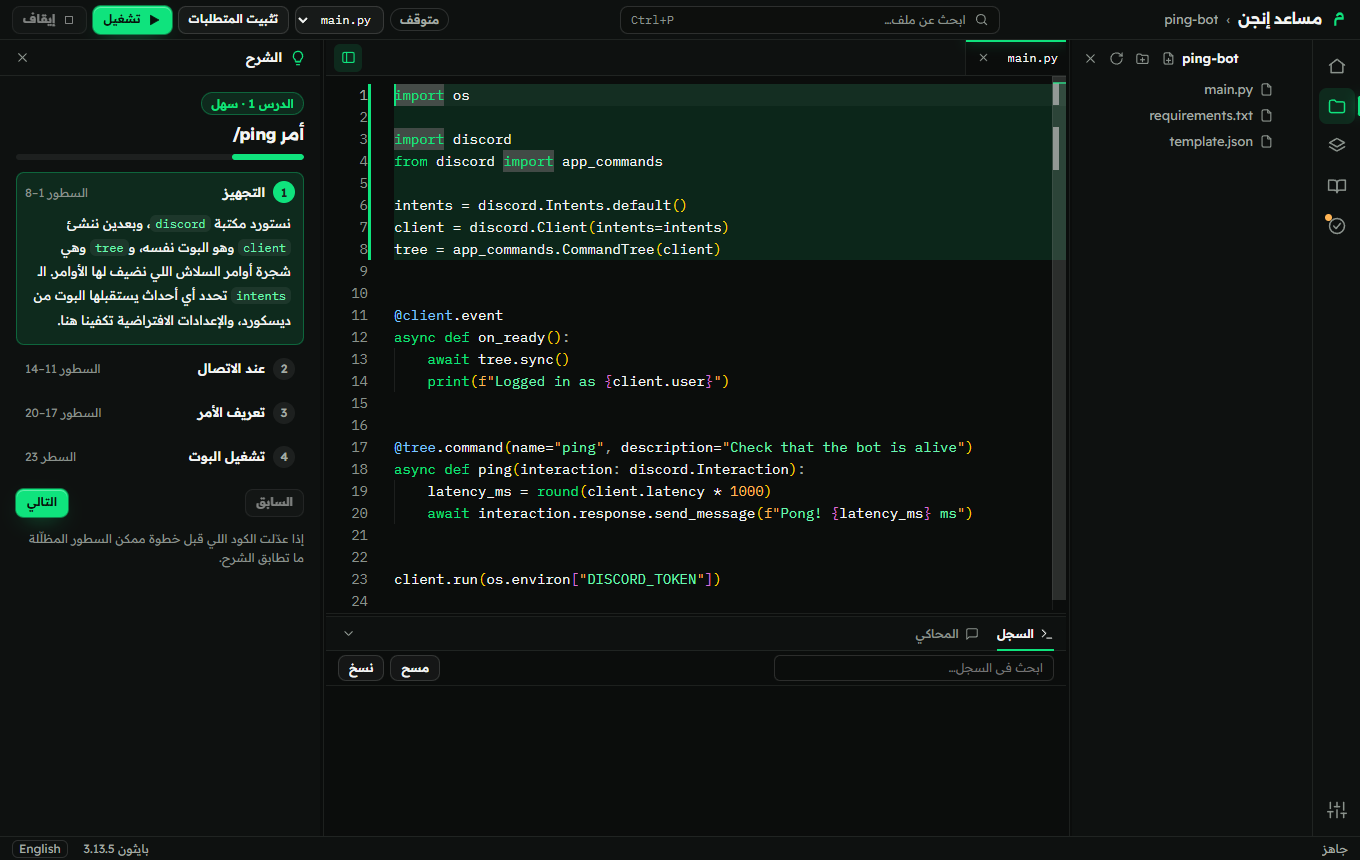
Musaed Engine · ping-bot / main.py
8دروس عمليةhands-on lessons
0توكن تحتاجه عشان تجرّبtokens needed to practise
محليLocalكل شي يشتغل على جهازكruns entirely on your computer
AR · ENواجهة عربية كاملةfully Arabic interface
من الكود إلى النتيجةFrom code to result
اكتب سطرين، وشوف وش سوواWrite two lines, see exactly what they did
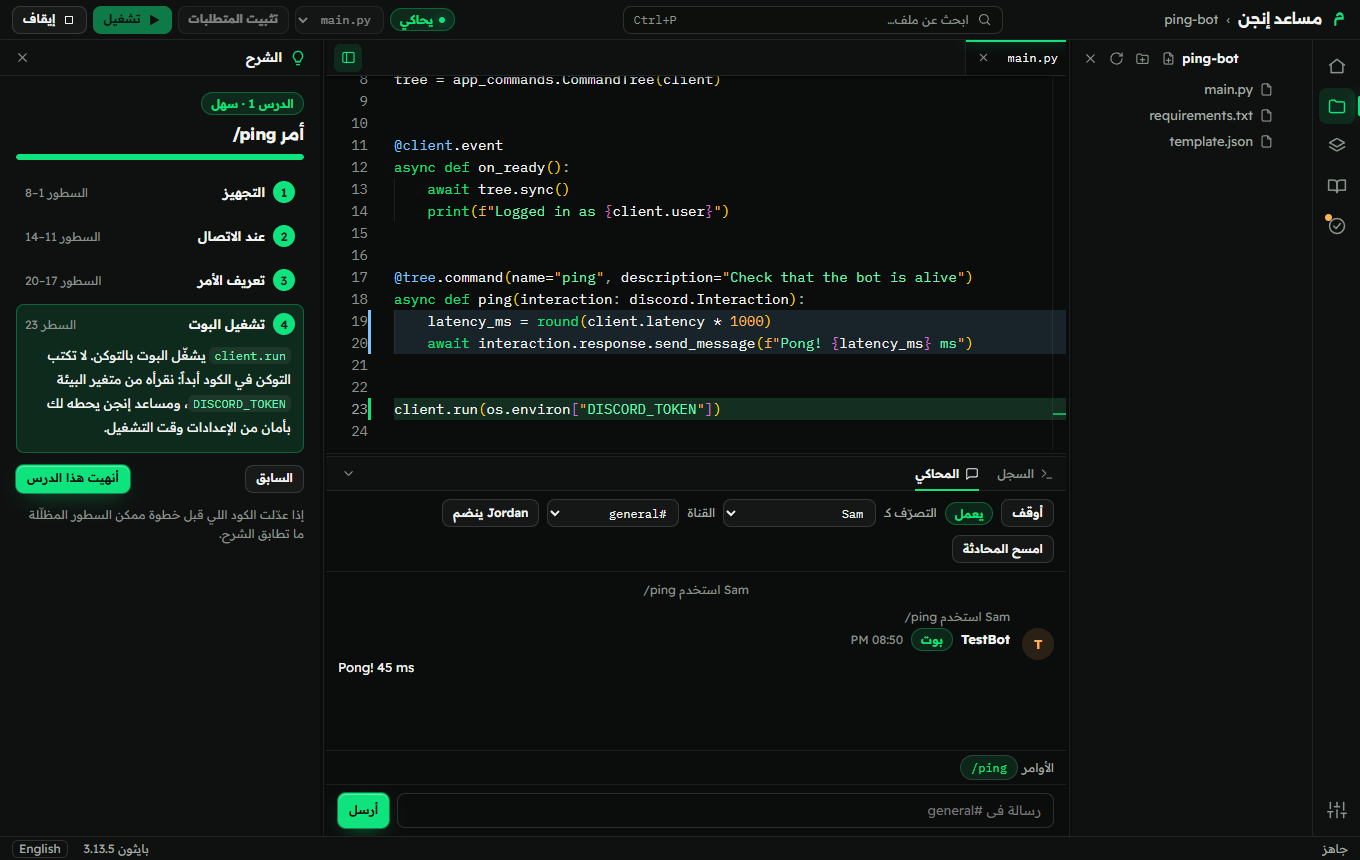
ارسل أمر في المحاكي، وتضيء السطور اللي اشتغلت ويطلع لك الرد وكم أخذ من وقت. تتعلّم من النتيجة مو من التخمين.Send a command in the simulator and the lines that ran light up next to the answer and how long it took. You learn from the result, not from guessing.
main.pyPython · discord.py
@tree.command(name="ping", description="Is the bot alive?")async def ping(interaction: discord.Interaction): latency_ms = round(client.latency * 1000)await interaction.response.send_message(f"Pong! {latency_ms} ms")# the highlighted lines ran
المحاكيSimulator#general
S
Sam عضوmember
/ping
T
TestBot بوتBOT
Pong! 45 ms
السطور اللي اشتغلتlines ran: 19–20الاستجابةresponse: 45 msأقل من 3 ثوانيunder 3 s
المزاياFeatures
كل اللي تحتاجه عشان تتعلّم وتبنيEverything you need to learn and build
محاكي ديسكوردDiscord simulator
يشغّل بوتك زي ما هو على ديسكورد وهمي: أوامر سلاش، أزرار، قوائم، نوافذ إدخال، ودخول الأعضاء وخروجهم. يحاكي النوايا (intents) وقاعدة الثلاث ثواني، وينبّهك على اللي بيفشل على ديسكورد الحقيقي.Runs your bot unchanged on a pretend Discord: slash commands, buttons, menus, forms, members joining and leaving. It copies intents and the three-second rule, and warns you about what would fail on the real Discord.
دروس تفاعليةInteractive lessons
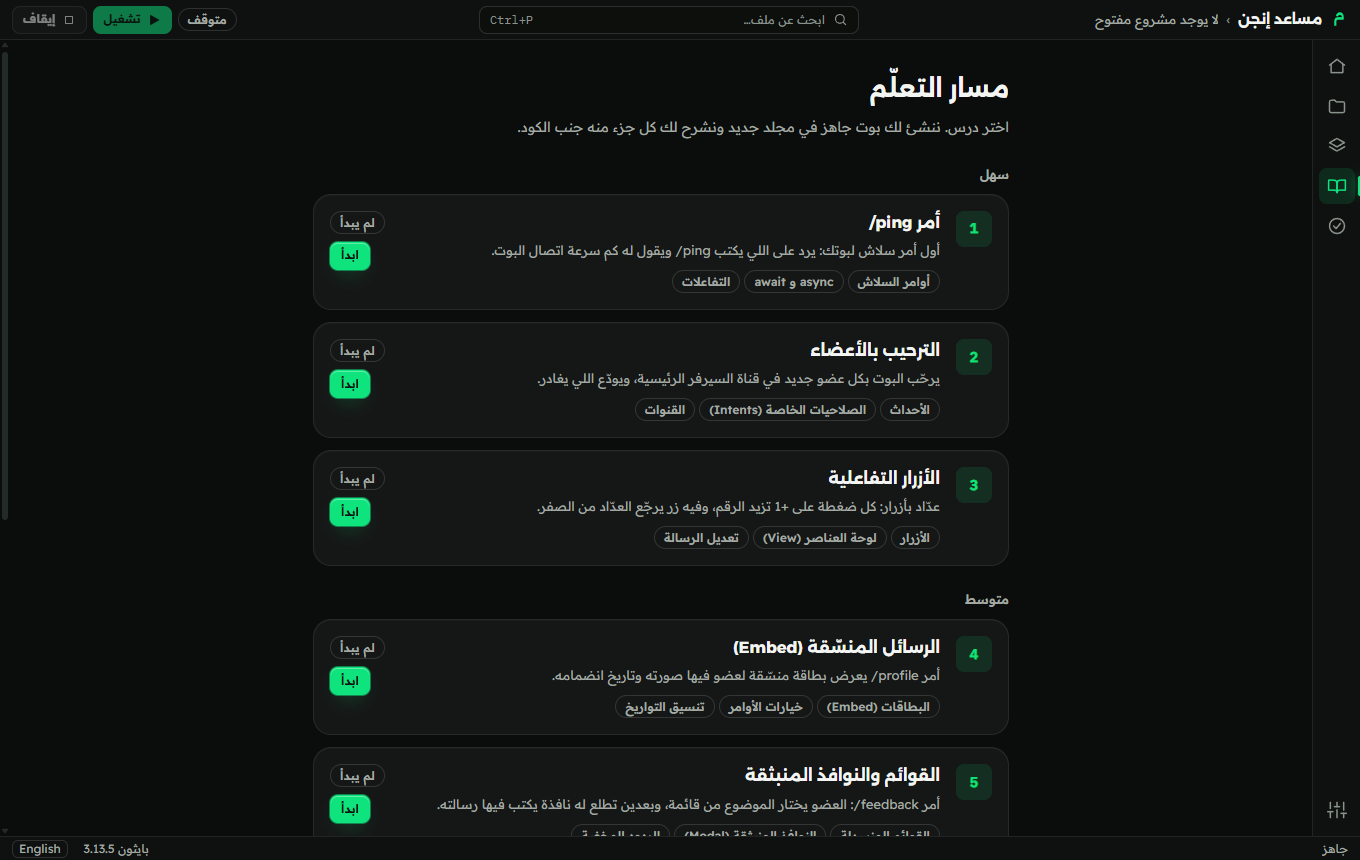
ثمانية دروس، كل درس مشروع حقيقي، وكل خطوة تضيء سطورها وتشرحها لك.Eight lessons, each a real project, each step lighting up and explaining its lines.
خريطة البوتBot map
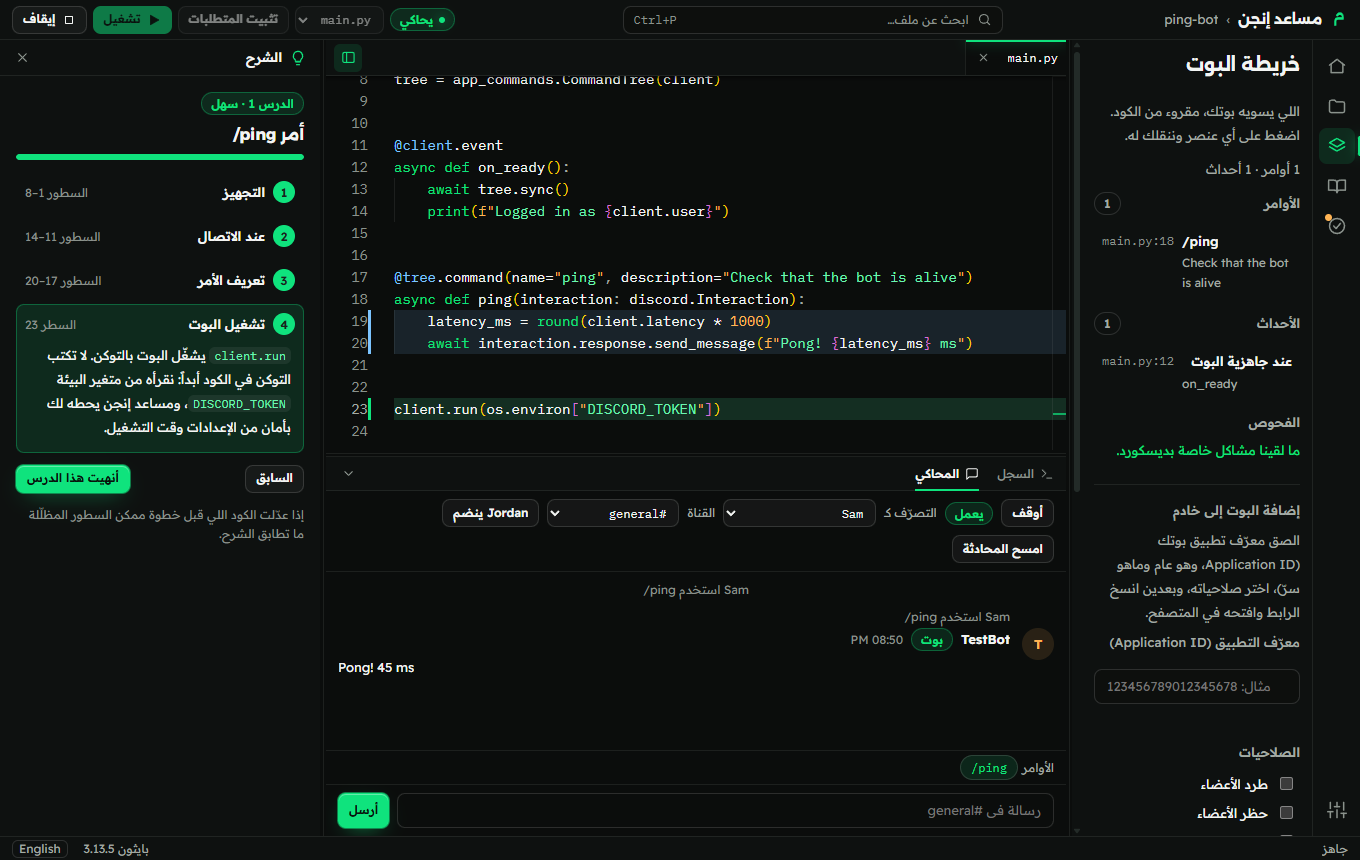
أوامرك وأحداثك وأزرارك في قائمة وحدة، وتضغط عليها وتنقلك للسطر.Your commands, events and buttons in one list; click to jump to the line.
أخطاء تفهمهاErrors you can understand
لما يفشل التشغيل البرنامج يشرح لك السبب بكلام بسيط ويقترح الحل، والفحوصات تنبّهك قبل التشغيل.When a run fails the app explains why in plain language and suggests the fix, and checks warn you before you run.
التوكن مشفّر وللكتابة بس وما يشوفه أحد، وتشغيل الكود يحتاج مجلد وثّقت فيه، والملفات محصورة في مشروعك.The token is encrypted and write-only, running code needs a folder you trusted, and file access stays inside your project.
رابط الدعوةInvite link maker
يبني الرابط بالصلاحيات اللي يحتاجها كودك فعلاً.Builds the link with the permissions your code actually needs.
عربي أولًاArabic first
واجهة عربية كاملة من اليمين لليسار، وبضغطة وحدة تتحول إنجليزي.A fully Arabic right-to-left interface, with English one click away.
لا تخسر عملكNever lose your work
تعديلاتك اللي ما انحفظت ترجع لك لو انقفل البرنامج فجأة، والبرنامج يتحدّث بنفسه.Unsaved edits come back after an unexpected close, and the app updates itself.
كيف يعملHow it works
من الصفر لين بوت شغّال في أربع خطواتFrom zero to a working bot in four steps
01
اختر درسPick a lesson
ثمانية دروس من أمر /ping البسيط لين درس «اعثر على الخطأ».Eight lessons, from a simple /ping command to "find the bug".
02
اقرأ وشغّلRead and run
لوحة الشرح تضيء السطور اللي تتعلّمها الحين، وتشرح كل خطوة بكلام بسيط.The explanation panel lights up the lines you are learning and explains each step in plain language.
03
جرّب في المحاكيTest in the simulator
ارسل أمر أو اضغط زر في ديسكورد وهمي، وشوف الرد والسطور اللي اشتغلت، بدون توكن.Send a command or press a button in a pretend Discord, and see the reply and the lines that ran, with no token.
04
شغّله على ديسكوردRun it on Discord
حط التوكن مرة وحدة في الإعدادات: ينحفظ مشفّر وما يظهر في أي مكان.Put the token in Settings once: it is stored encrypted and never shown anywhere.
Musaed Engine · lesson 1
الذكاء الاصطناعيAI
استخدم تطبيق الذكاء الاصطناعي اللي تحبهUse the AI app you already like
ما نبني دردشة ولا نشغّل سيرفر للذكاء الاصطناعي. لو عندك تطبيق يدعم MCP (مثل Claude Code أو Cursor)، فعّله من الإعدادات عشان يشوف مشروعك ويعدّل ملفاته ويشغّله ويجرّبه في المحاكي.We do not build a chat or run an AI server. If you have an app that supports MCP (such as Claude Code or Cursor), switch it on in Settings so it can see your project, edit its files, run it and test it in the simulator.
مقفل من البداية، ويشتغل على جهازك بس وبكلمة سر.Off by default; local to your computer and protected by a secret.
ما في أداة للتوكن أبداً: ما يشوفه ولا يقراه.There is no tool for the token at all: it cannot see or read it.
بدون حسابات ولا مفاتيح ولا سيرفر.No accounts, no keys, no server.
Settings → AI assistants (MCP)127.0.0.1
$ claude mcp add --transport http musaed-engine \ http://127.0.0.1:47615/mcp \ --header "Authorization: Bearer ••••••••"✓ read_file · write_file · run_start✓ simulator_run_command · get_bot_map✗token: no such tool
بصراحةHonestly
اللي لازم تعرفه قبل ما تبدأWhat to know before you start
ويندوز حالياًWindows for nowيحتاج بايثون 3.10 أو أحدث على جهازك، والبرنامج يساعدك لو ما لقاه.Needs Python 3.10 or newer on your computer; the app guides you if it is missing.
المحاكي تقريبThe simulator approximatesجرّب على ديسكورد الحقيقي قبل ما تعتمد عليه.Test on the real Discord before you rely on it.
بايثون مو معزولPython is not sandboxedأي كود تشغّله، أنت أو تطبيق ذكاء اصطناعي، يشتغل بصلاحياتك أنت.Any code you run, or an AI app runs, has your account's permissions.
وصول مبكرEarly accessممكن تلقى أخطاء، وبنصلحها بسرعة.You may find bugs, and we will fix them quickly.
أسئلة شائعةFAQ
أسئلة شائعةFrequently asked
هل يحتاج إنترنت؟Does it need the internet?
لا، المحرر والدروس والمحاكي تشتغل بدون إنترنت. تحتاج الإنترنت بس عشان تثبّت المكتبات (pip) وتشغّل بوتك على ديسكورد وتبحث عن التحديثات.Not to use it: the editor, lessons and simulator work offline. You need it to install libraries (pip), to run your bot on Discord, and to look for updates.
البرنامج يشوف التوكن؟Can the app see my token?
التوكن ينحفظ مشفّر بواسطة نظام التشغيل، وما يوصل لنافذة البرنامج، وما ينكتب في السجل، وتطبيق الذكاء الاصطناعي ما يشوفه. يوصل لبوتك بس لما تشغّله بزر التشغيل.The token is stored encrypted by the operating system, never reaches the app's window, is never written to the log, and an AI app cannot see it. It is given to your bot only when you run it with the Run button.
وش يُرسل عني؟What is sent about me?
أرقام مجهولة بس (رقم عشوائي، الإصدار، اللغة، النظام، وأحداث مثل «بدأ درس»)، والبرنامج يعلمك فيها أول مرة يشتغل. تقدر توقفها وتحذف اللي انرسل بزر من الإعدادات. ما في ملفات ولا مسارات ولا توكن. التفاصيل.Anonymous numbers only (a random id, the version, the language, the system, and events such as "started a lesson"), and the app tells you the first time it starts. You can turn them off and delete what was sent with one button in Settings. No files, no paths, no token. Details.
لازم أعرف بايثون؟Do I need to know Python?
لا. تبدأ من الدرس الأول، وهو مسوّى لمن ما كتب بوت قبل.No. You start at lesson 1, which is made for someone who has never written a bot.
سوّي أول بوت لك اليومBuild your first bot today
نزّل مساعد إنجن وابدأ الدرس الأول في دقايق.Download Musaed Engine and start lesson 1 in minutes.